


MyMountSinai
4.51.34K Reviews
App Specs
- Version
- 11.8.3
- Updated On
- License
- Free
- Downloads
- 100,000+
- Developer
- Mount Sinai Health System
- Categories
- Medical
- Platform
- Android
Screenshots
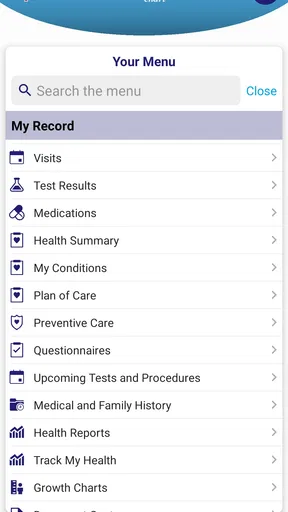
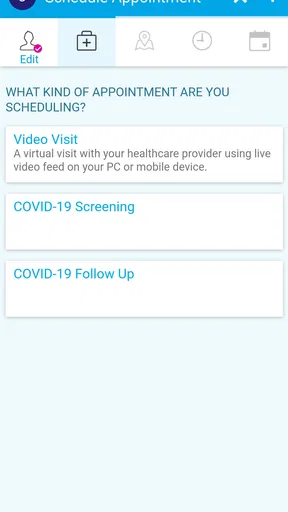
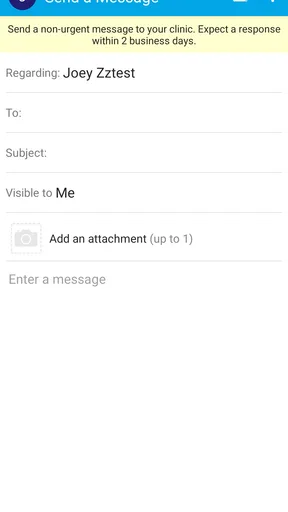
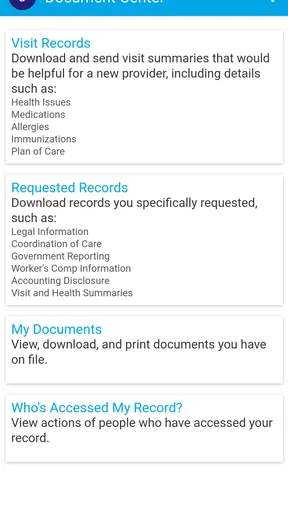
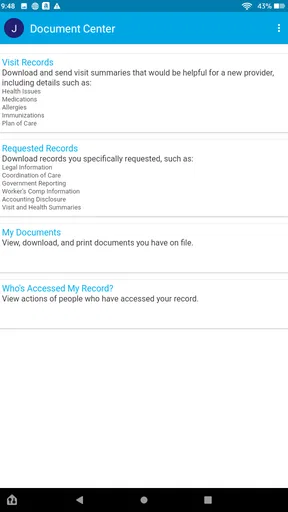
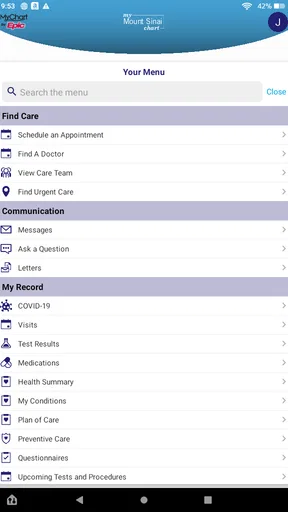
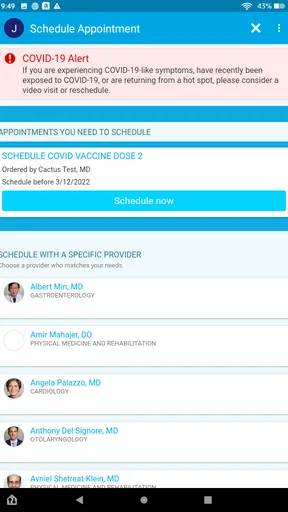
 Analysis by AppCompare
Managing healthcare is rarely difficult because of one huge task. It is difficult because appointments, messages, test results, prescriptions, bills, and family responsibilities arrive at different times and in different places. MyMountSinai brings those parts of the Mount Sinai Health System into one mobile medical app, and after using it, I found its main value less about novelty and more about reducing the number of separate steps I need to remember.
Developed by Mount Sinai Health System, this free app is aimed at patients who already use that healthcare network or expect to interact with it regularly. It belongs firmly in the medical app category rather than the general wellness space: its usefulness depends on real care relationships, not on exercise tracking or broad health advice. The app is rated for Everyone, and its current version is 11.8.3 for devices running at least iOS or Android 11, depending on the platform you use.
I would not describe it as a replacement for urgent medical help, a personal diagnosis tool, or a universal health record. Instead, I see it as a digital front door for Mount Sinai patients. That distinction matters. If your doctors, appointments, and records are outside this system, much of the app’s value disappears. If you regularly deal with Mount Sinai, however, keeping the app available can make ordinary administrative healthcare feel more manageable.
How clearly the app supports different patients and situations
I find that the app’s clearest benefit is giving Mount Sinai patients a single mobile place to begin routine care tasks, rather than making them piece together reminders and follow-ups from memory. That can be especially helpful when a patient’s needs or schedule change from week to week. The next section looks at how that central starting point can fit into everyday use without assuming it replaces other forms of care.
Readability and navigation: useful when healthcare information is already stressful
The strongest design choice is the attempt to gather healthcare actions in one place. A patient who is checking an appointment, looking for a result, or trying to contact a care team does not want to search through several unrelated services. A centralized app can reduce that mental load, especially when the alternative is switching between email, phone calls, paper instructions, and a browser portal.
That convenience is most noticeable during a normal week rather than a dramatic medical event. I can imagine opening the app after receiving a reminder, checking what the visit is for, reviewing the relevant information, and then returning later to follow up. The benefit is not that every task becomes instant. It is that the app gives those tasks a recognizable home.
For people who read slowly, have limited concentration, or are already anxious about a health issue, clear grouping matters as much as the number of available tools. Medical language can be tiring even when the interface itself is simple. I found it helpful to approach the app with one purpose at a time: check an appointment, review a message, or look for a result, rather than trying to understand every area in one sitting.
Worth Reading Before You Choose

EA SPORTS FC Mobile 26 Is a Bigger Football Game, but It Takes Time

Flipboard Shows What News Apps Must Do Beyond the Feed

Switching to Android Auto Means Rethinking Your Driving Routine

Google Calendar Makes a Crowded Week Easier to Manage

Ludo King Makes the Most of the Minutes Between Plans

Baby Panda World Brings Quick Play to Modern Phones, but Its Game Library Feels Busy
The app’s broad scope can also create friction. Putting many healthcare services together means there is more to scan, and a first-time user may need a moment to learn where a particular action lives. This is a common trade-off in patient portals: consolidation reduces app switching, but it does not automatically make every pathway obvious. I would advise new users to explore the navigation when they are calm, not five minutes before an appointment.
MyMountSinai has a practical advantage over a generic calendar or notes app because the information is connected to the healthcare system rather than manually copied by the patient. A calendar can remind me that I have a visit, but it cannot serve as the same central place for the related patient workflow. On the other hand, a general browser portal may feel more comfortable to someone who prefers a larger screen, especially when reading detailed medical information or typing a long message.
Motor and sensory considerations: fewer handoffs, but not every barrier disappears
Reducing repeated phone calls can be meaningful for users with limited dexterity, fatigue, speech difficulties, or communication preferences that make telephone-based healthcare harder. A patient portal gives those users another way to handle routine contact and organization. In my view, that is one of the app’s most important inclusive qualities: it can make ordinary healthcare administration less dependent on a single communication method.
There is also a practical benefit for people who struggle with memory. Instead of relying on a handwritten note or trying to remember which office said what, the app provides a place to return to for Mount Sinai-related tasks. I would still keep personal notes for questions to ask a clinician, but using the app as the starting point can make preparation more orderly.
People with visual sensitivities or attention-related difficulties may prefer using the app for short, targeted visits rather than prolonged browsing. I would adjust the phone’s own display settings if needed, such as text size, contrast, or screen-reading options supported by the operating system, and then check whether the resulting layout remains comfortable. I would not assume that every screen will respond perfectly to every device setting; medical apps often contain different types of content, and a setting that helps one page may make another feel crowded.
For users with hearing-related needs, a text-based patient workflow can be more convenient than depending on spoken instructions during every interaction. Yet the app should not be treated as proof that every communication need is covered. Some healthcare situations still require direct conversation, and a digital message may not provide the speed or nuance of a phone or in-person exchange.
Motor accessibility also depends on the physical context. Someone using a phone one-handed while carrying a bag may find any multi-step medical task awkward. A person with tremors or reduced precision may need to slow down before selecting an appointment or sending a message. My practical tip is to complete important tasks while seated and with enough time to review the final screen. In healthcare, avoiding an accidental selection is more important than finishing quickly.
Situational access: where the app fits into everyday healthcare
A realistic example is a patient who receives care from several Mount Sinai departments. They may have an upcoming visit, a question for a care team, and information to review after a previous appointment. Instead of treating each item as a separate project, they can begin in the same app, identify what needs attention, and handle the simplest task first. That does not eliminate waiting or clinical complexity, but it can make the sequence easier to follow.
The app can also be useful for people whose schedules make office calls inconvenient. A parent coordinating care around school, a worker who cannot spend long periods on hold, or someone managing treatment while traveling locally may appreciate being able to check healthcare tasks from a phone. The advantage is especially clear when the user needs to confirm information rather than explain a complicated new symptom.
For older adults, the answer is more mixed. A smartphone can be easier than a paper folder because it stays available and searchable, but it can also introduce unfamiliar navigation and login steps. I would recommend setting up the app with a trusted family member or caregiver present if the patient wants help, while making sure the patient remains in control of their own account and decisions. The app may support organization, but it does not replace a person who can explain medical information patiently.
Caregivers should also be realistic about whose information they are managing. A family member may be able to help with reminders and preparation, but access to another person’s healthcare information depends on the account and permissions available in the healthcare relationship. I would not assume that installing the app automatically creates shared access. That is an important privacy and workflow question to settle before an appointment, not during a crisis.
For someone with an unreliable internet connection, a phone with limited storage, or a preference for offline paperwork, the app may be less dependable as a sole method of organization. Digital convenience works best when the device is charged, the user can sign in, and the network connection behaves. I would keep essential appointment details and urgent contact information available through another method rather than relying on one app for every contingency.
Remaining barriers: what I would want users to plan around
The first barrier is system dependence. MyMountSinai is most useful when Mount Sinai is the healthcare network behind the patient’s appointments and records. It is not a universal container for every doctor a person may see. If your primary care provider, specialist, pharmacy, and hospital use unrelated systems, you may still need several portals. In that situation, a general health-record strategy or a browser-based approach may be more practical than expecting this app to unify everything.
The second barrier is that a central portal can make users think every healthcare need belongs there. It does not. A patient may still need to call an office, speak with a clinician, visit a facility, or seek immediate help elsewhere. I would use the app for organization and routine communication, not for deciding whether a serious symptom can wait. The presence of a medical app should never create false reassurance.
Privacy is another consideration. A phone can be shared, misplaced, or viewed over someone’s shoulder. I would use the device’s available security protections and avoid leaving sensitive screens open in public. This is not a criticism unique to MyMountSinai; it is simply the cost of carrying personal healthcare information in a mobile format. People who are uncomfortable with that trade-off may prefer a desktop browser or direct contact with the healthcare provider.
There is also a learning curve for patients who rarely use apps. Even when the main purpose is clear, healthcare vocabulary and account steps can make the experience feel more demanding than a normal consumer app. I would not judge the app after only one hurried attempt. A better test is whether it becomes easier after the patient has used it for a few routine tasks and established a personal habit for checking it.
Another limitation is emotional rather than technical. Seeing medical information on a phone can encourage repeated checking, especially when a patient is worried. I found it healthier to open the app with a specific question and then close it after completing the task. That small habit prevents the portal from becoming a source of constant uncertainty or distraction.
Who should use it, and who may prefer another option?
I would recommend MyMountSinai to patients who receive ongoing care through Mount Sinai and want one mobile starting point for managing that relationship. It is particularly suitable for people who value digital communication, need help keeping healthcare tasks organized, or find repeated office calls difficult. The free price also removes a financial barrier to trying it, although the app itself does not change the cost of medical care.
It may be a good fit for a busy adult who wants to check healthcare information between other responsibilities, for a patient managing multiple appointments within the same system, or for someone who wants a clearer routine than scattered emails and paper reminders provide. Its Everyone age rating makes it broadly approachable from a content perspective, though younger users may still need an adult’s help with their healthcare account and decisions.
I would suggest a different approach for someone whose care is spread mostly across other networks, someone who strongly prefers a full-size computer screen, or someone who needs a personal health record that combines information from many unrelated providers. A browser portal may be better for long reading and typing. A phone calendar may be better for simple reminders. A direct call may be better when the issue is urgent, complicated, or difficult to explain in writing.
The app’s public reception is encouraging without being a reason to install it blindly: it has a 4.6 average from around 3.1 thousand ratings, with more than 1.3 thousand written reviews and over 100 thousand installs. Those figures suggest that many patients find the concept useful, but they cannot predict how smoothly it will fit a particular clinic relationship, phone, communication style, or accessibility need.
My inclusive verdict after using the Mount Sinai patient portal
MyMountSinai succeeds when I treat it as a practical healthcare organizer rather than a complete medical companion. Its real strength is bringing Mount Sinai-related tasks into a familiar mobile space, which can reduce app switching and make routine care easier to track. For people with limited time, memory challenges, communication preferences, or difficulty making repeated calls, that centralization can be genuinely helpful.
Its inclusive value is strongest in the choices it gives patients: a digital route for routine healthcare administration, access from a phone, and a single place to begin. Its limits are equally important. Navigation may take practice, a mobile screen is not ideal for everyone, access depends on the patient’s relationship with Mount Sinai, and the app cannot replace urgent care or human explanation.
My final advice is to install it if Mount Sinai is part of your regular care and test it with a low-pressure task first. Adjust your phone’s display and security settings, explore the main areas before an appointment, and keep a backup way to contact your care team. With those habits, MyMountSinai is a useful accessibility-minded option for organizing patient care, not because it solves every barrier, but because it removes several avoidable ones.
Released on August 4, 2021 and maintained by Mount Sinai Health System, the app has developed into a focused tool for patients who want their healthcare interactions closer at hand. I would recommend it to the right Mount Sinai patient, especially one who benefits from written, centralized access. I would skip it only when my care is elsewhere, my needs are primarily urgent, or a larger-screen and more universal record system would serve me better.
Pros
- Secure access to appointments
- test results
- and medical records
- Easy prescription refill requests from a mobile device
- Supports video visits for eligible appointments
- Lets users message care teams without calling the hospital
- Provides directions and contact details for Mount Sinai locations
Cons
- Some features may only be available to existing Mount Sinai patients
- Appointment options depend on provider availability and location
- Video visits require a compatible device and reliable internet
- Notifications may require careful setup to avoid missing updates
- Certain records or results may appear after a processing delay
FAQs for MyMountSinai
What is MyMountSinai, and what can I use it for?
MyMountSinai is the official patient portal app for Mount Sinai patients. After signing in, you can typically view upcoming and past appointments, review test results, read clinical notes, request prescription refills, message eligible care teams, manage billing information, and access parts of your medical record. Available features may vary depending on your provider, location, and the type of care you receive.
How do I sign in to MyMountSinai if I already have a Mount Sinai account?
You generally sign in with the same MyMountSinai or MyChart credentials used through Mount Sinai’s online patient portal. New users may need an activation code from Mount Sinai, an eligible clinic, or the registration process offered in the app. If you forget your password or cannot verify your identity, use the recovery options or contact Mount Sinai support rather than creating multiple accounts.
Can I use MyMountSinai to schedule appointments and communicate with my doctor?
In many cases, the app allows patients to request or schedule appointments with participating Mount Sinai departments, view appointment details, and receive reminders. It may also provide secure messaging with selected physicians or care teams. However, not every specialty supports online scheduling or messaging, and urgent symptoms should never be handled through the app; contact emergency services or your provider directly when appropriate.
Can I view test results, prescriptions, and medical records in MyMountSinai?
MyMountSinai can provide access to many parts of your electronic health record, including laboratory and imaging results, medications, immunizations, visit summaries, and clinical documents. Results may appear at different times depending on processing and provider review, and some information may be temporarily restricted for privacy or clinical reasons. Always discuss confusing or concerning results with a qualified healthcare professional.
Is MyMountSinai free, and is my personal health information secure?
The MyMountSinai app is generally free to download and use, although normal mobile data charges may apply and healthcare services themselves can involve separate costs. The app uses account authentication and security protections designed to safeguard patient information, but you should still use a strong, unique password, enable available device security, avoid public Wi-Fi for sensitive access, and sign out on shared devices.


